
Technology & Investigation · Paranormal Research
Why Paranormal Video Review Needs Real Tools
Recording everything is not enough. Investigators need a way to slow the footage down, pull detail out of the dark, and mark exactly what the camera captured — without ever pretending the software knows what it means.
Video has become one of the most important forms of documentation in paranormal investigation. A camera can watch a room long after the investigators have moved elsewhere. It can preserve movement, light changes, shadows, equipment reactions, investigator positions, and environmental context. It can also help confirm whether a sound came from inside a room, whether a team member was nearby, or whether a possible anomaly had an ordinary explanation.
But video review has two problems. There is usually too much footage — and a media player is the wrong tool for examining any of it.
A single investigation can produce hours of footage from static cameras, handheld cameras, phone video, body cameras, hallway cameras, room cameras, and equipment-focused cameras. Somewhere inside that footage may be a door moving, a shadow passing, a light shifting, an object falling, or an investigator reacting to something off camera. Finding that moment is one challenge. Actually examining it — slowing it down, lifting the shadows, checking it against the untouched original, and deciding whether it means anything — is another challenge entirely, and an ordinary video player was never built for it.
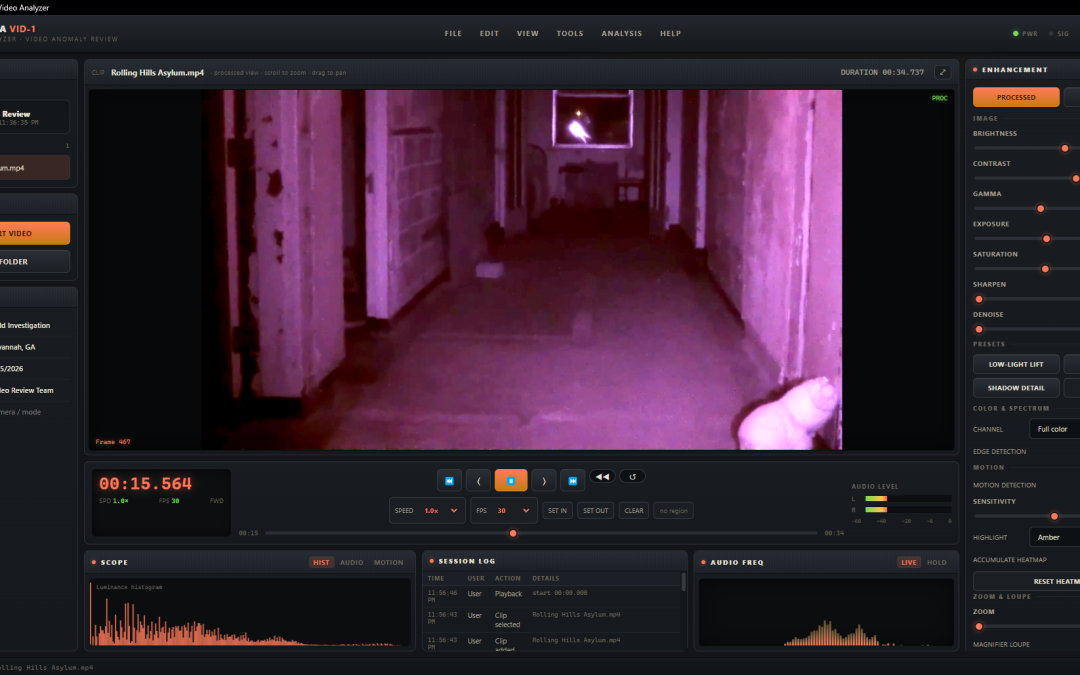
That is where the Lodestra VID-1 Field Analyzer comes in — a dedicated review tool that lets you step through footage frame by frame, enhance what the camera struggled to show, mark the moments that matter, and export documentation that holds up.
Video Evidence Is Only Useful When It Can Be Found Again
Every paranormal investigator knows the frustration of trying to relocate a moment in a long recording. Someone remembers that something happened "around the middle" of the video. Another investigator thinks it was "about an hour in." A clip may have been seen during review, but no one wrote down the exact timestamp. A screenshot may have been taken, but it is not connected to the original file.
By the time the team starts assembling a final report, the moment is difficult to find, verify, or explain. A video moment should never exist only as a memory. It needs to be tied to the original recording, the exact timestamp, the visual frame, the room, the camera angle, investigator notes, and any possible explanations that were considered. The VID-1 Field Analyzer turns marked moments into structured entries — each with its own timestamp and captured frame — rather than vague notes or loose screenshots.
Why Timestamps Matter in Video Review
A timestamp is one of the most important pieces of video documentation. Without it, a visual anomaly is difficult to evaluate. Investigators may not be able to return to the original moment. Other reviewers cannot confirm what was seen. The video cannot be compared easily with audio recordings, environmental logs, equipment activations, room notes, or investigator movement.
With a timestamp, the moment becomes part of the case timeline. Imagine a camera captures a shadow crossing a hallway at 01:14:22. That exact time can be compared with several other pieces of information:
What a timestamp makes possible
- Was anyone documented walking nearby at that time?
- Did another camera capture the same hallway from a different angle?
- Did an audio recorder pick up footsteps at the same moment?
- Did an EMF meter or environmental sensor react nearby?
- Were investigators confirmed in another room when it happened?
- Was there outside traffic, a flashlight sweep, or a passing reflection?
A timestamp allows a video event to be tested against the rest of the investigation. Without it, the moment becomes much weaker as evidence.
Frame by Frame, at Your Own Pace
Real review does not happen at normal playback speed. The moments that matter are often a fraction of a second long — a flicker at the edge of the frame, a single step of movement, a shape that is there for three frames and gone. Watching footage straight through at full speed is the surest way to miss them.
The VID-1 Field Analyzer is built for slow, deliberate review. You can step one frame forward or back to land on the exact image you need, slow playback down to a fraction of normal speed or run it back in reverse, and loop a marked region so a brief event plays over and over while you study it. When detail is small, deep zoom and a magnifier loupe let you inspect the picture down to the pixel — so you can tell the difference between a real edge and ordinary compression noise, instead of guessing from a blurry full-speed glimpse.
Pulling Detail Out of the Dark — Without Inventing It
Most paranormal footage is shot in difficult conditions: near-total darkness, infrared illumination, heavy grain, and cameras pushed to their limits. The detail you need is often buried in the shadows rather than absent. The VID-1 Field Analyzer gives you a full set of enhancement tools to bring that detail forward.
You can lift brightness, gamma, and exposure to open up crushed shadows, reduce noise or sharpen edges, isolate a single color channel, apply false-color and night-vision renders to separate subtle gradients, and switch on edge detection to test whether a "shape" has a real, consistent outline. A motion-detection pass highlights what changed between frames, and an accumulating heatmap maps where movement happened across an entire clip — a fast way to catch motion you would miss by eye, and an equally fast way to confirm that a "figure" was just an investigator walking through.
Every one of these tools is non-destructive. The original file on disk is never altered; enhancement only changes what you see on screen and what you choose to export. And a one-press RAW comparison flips instantly between your processed view and the untouched original — so you, and anyone reviewing your work later, can always see exactly what the camera recorded versus what enhancement revealed.
Reveal, Don't Invent
Enhancement is interpretation, and it has to be handled honestly. Strong sharpening and aggressive shadow-lifting can create texture and shapes the camera never saw. Low light distorts form, compression produces strange movement, and infrared reflects off dust, insects, glass, polished surfaces, and moisture. The tools in VID-1 are there to make a faint, real detail easier to see — not to manufacture one. That is exactly why the RAW comparison is always one press away, and why a moment that only appears under heavy processing should be documented as exactly that.
Sound and Picture, Reviewed Together
Most footage carries audio, and that audio is evidence too. The VID-1 Field Analyzer analyzes the clip's sound in step with the picture, using the same engine as the Lodestra EVP-1 audio tool: a scrolling spectrogram, a live or peak-hold frequency display, and left/right level meters that move as the clip plays.
That matters because picture and sound corroborate each other. A shadow crossing a doorway means more if a footstep lands at the same instant — and far less if the audio shows the noise came from an investigator in the next room. Reviewing both together, on the same timeline, is how a single camera becomes a cross-check rather than a lone clip.
Markers, Frames, and Tags
Examining footage is only half the job; the other half is documenting it so the work survives review. In the VID-1 Field Analyzer, marking a moment pauses playback, captures the current frame as a snapshot, and drops a time-stamped entry you can label, tag, and annotate. The result is a structured record, not a loose pile of screenshots.
Not every moment is the same kind of moment, so the marker tags are purpose-built for the work:
Each marker carries its tag, a short label, a longer note, and its captured frame. In the note you record the working status of the moment — needs review, matches a client claim, cross-check against audio, or debunked — so that as review continues, a moment first tagged "Shadow / needs review" can be updated to "Shadow / investigator contamination" without ever losing the original frame and timestamp. By the end of review you can move straight to the markers that matter instead of scrolling through a long list of undifferentiated notes.
The Tool Reveals; the Investigator Decides
This is the most important thing about the software, and it survived every feature that was added to it. The VID-1 Field Analyzer gives you powerful tools to see and document footage — but it never decides what the footage means.
It will not tell you that a shadow is a figure, that a light is an apparition, or that a blur is meaningful. It does not score, classify, or conclude. Those judgments require human review, context, skepticism, and comparison with the rest of the case — and the software deliberately leaves them with the investigator. Its job is to make the picture clearer and the record cleaner, then get out of the way.
The goal is not to make footage seem more paranormal. The goal is to understand what the footage actually shows.
Video Review Should Include Debunking
A good investigation does not only collect strange moments. It also documents what was ruled out. A moving shadow may be caused by an investigator off camera. A light anomaly may be a flashlight, a phone screen, a passing vehicle, or an automatic exposure adjustment. A figure-like shape may be pareidolia. A door movement may be air pressure, loose hinges, or uneven flooring.
This is where the analyzer's tools earn their place. A motion heatmap can show that "movement" was just an investigator walking through. A RAW comparison can reveal that a "figure" only exists after heavy enhancement and vanishes in the untouched frame. Synced audio can place the source of a noise in another room. A moment can be marked "needs review" and later updated to "reflection," "contamination," or "debunked." If a team only documents the strange-looking moments, the review is incomplete. Recording what was ruled out is what protects the credibility of the investigation.
Comparing Findings Across Evidence Types
Video becomes more powerful when it is compared with other evidence. A camera may capture movement at the same time an audio recorder captures a sound. A piece of equipment may activate on video while environmental logs show a temperature change. A witness may report hearing footsteps in the same hallway where video later shows a shadow or light shift. But those comparisons only work if the video moment is properly marked, timestamped, and preserved.
A tagged video moment can be cross-referenced with
- Audio recordings
- EVP logs
- EMF readings
- Environmental sensor data
- Investigator notes
- Room logs
- Witness claims
- Camera placement maps
- Equipment activation records
- Case timelines
Better Reports, Better Records
The final report is where the investigation becomes something a client, location owner, or team member can understand. The difference between a weak and a strong report often comes down to one thing: documentation.
The VID-1 Field Analyzer helps transform raw footage into organized, reviewable investigative documentation — exported as captured frames, clips, and structured PDF reports — making final reports clearer, more professional, and easier to defend.
What the VID-1 Field Analyzer Helps Solve
Frame-by-Frame Review
Step one frame at a time, slow playback to a fraction of speed, run it in reverse, and loop a region — so brief moments never slip past at full speed.
Deep Zoom & Loupe
Zoom and pan into the picture and inspect it down to the pixel with a magnifier, to tell a real edge from ordinary compression noise.
Low-Light & IR Enhancement
Lift brightness, gamma, and exposure, reduce noise, and use night-vision and false-color renders to open up crushed shadows in dark footage.
Motion Detection + Heatmap
Highlight what changed between frames and build an accumulating heatmap of where movement occurred across an entire clip.
Spectrum & Edge Tools
Isolate color channels, apply false-color, and run edge detection to test whether a shape has a real, consistent outline.
Synced Audio Analysis
A spectrogram, frequency display, and level meters move in step with the picture, so sound and image corroborate each other.
RAW A/B Comparison
Flip instantly between the processed view and the untouched original. Enhancement is always non-destructive and always reversible.
Tagged Markers & Frames
Mark a moment to pause, capture its frame, and log a timestamped entry with a purpose-built tag, label, and notes.
Structured Exports
Build final reports from documented entries — captured frames, clips, and PDF reports — rather than from memory.
Lodestra VID-1 Field Analyzer
Turn Hours of Footage Into Organized Investigative Documentation
Built for paranormal investigation teams who need a faster, more structured way to review, enhance, tag, and report video evidence — all on your own machine, with no cloud and no account.
Explore the VID-1 Field AnalyzerThe Bottom Line
A strange movement, shadow, light change, or equipment reaction means very little if the team cannot find it again, examine it properly, connect it to the original recording, compare it with the investigation timeline, or explain what was ruled out. The Lodestra VID-1 Field Analyzer gives investigators a better way to work footage — frame-by-frame review, honest enhancement that reveals rather than invents, motion and spectrum tools, synced audio, RAW comparison, tagged markers with captured frames, and structured exports that support stronger reports.
In paranormal investigation, the question is not only what appeared on camera. The question is whether you examined it carefully enough — and documented it well enough — to understand it.